
Account at RagnaBet
Signing in to RagnaBet: the Log in form, a forgotten password and keeping the account safe
The RagnaBet login is a single dark panel with two fields. Here is what each part does, how to recover access and what to set up once you are in.
The Log in panel field by field
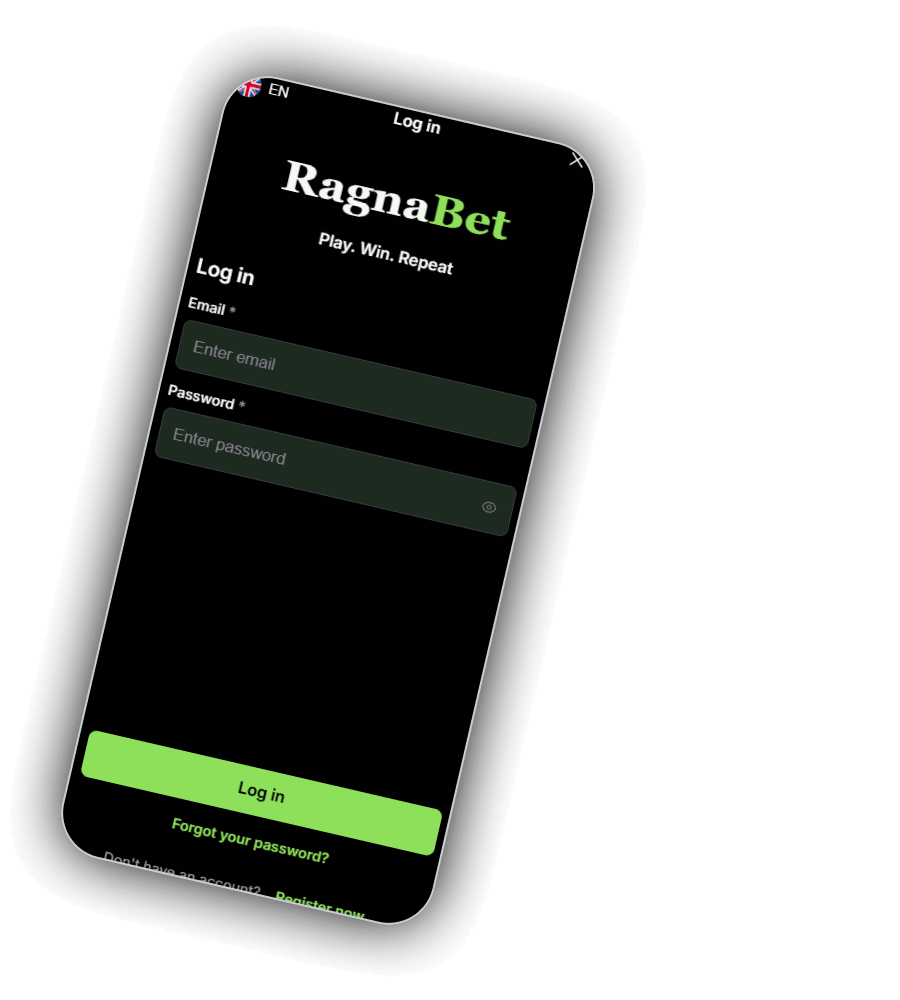
Tap Log in in the header and a black panel slides up. At the top left are a Union Jack and EN, in the centre the word Log in and a close cross on the right. Below that sits the RagnaBet wordmark in a serif face, Ragna in white and Bet in green, with the line Play. Win. Repeat underneath.
What the panel contains
| Part | Label on screen | Use |
|---|---|---|
| Field 1 | Email *, placeholder Enter email | The address you registered with |
| Field 2 | Password *, placeholder Enter password | An eye icon shows or hides what you type |
| Main button | Log in | Wide green button near the bottom |
| Link | Forgot your password? | Starts a reset by email |
| Last line | Don't have an account? Register now | Opens sign up |
The star marks a required field.
There is no Google, Apple or phone number login on the panel. Access is by email and password only.
Getting in, in four taps
- Tap Log in in the header, or the green profile button in the menu bar.
- Fill in the email linked to your RagnaBet account.
- Key in your password, tapping the eye to reveal it if you are unsure.
- Tap the green Log in button.
Once signed in, the Log in and Register buttons in the header are normally replaced by a balance and a profile icon. If the login fails, check for a typo in the email and make sure caps lock is off.
Forgot your password?
Below the main button, Forgot your password? opens the reset flow. Enter the account email and a link should arrive in your inbox. Look in spam or promotions folders if it does not show within a few minutes. Choose a new password you have not used on any other site.
RagnaBet staff will not ask for your password by email or chat. Anyone who does is not from the casino.
Register now and verification
Don't have an account? Register now sits on the last line of the panel. The same sign up also opens from the Register button in the header and the Join Now button in the menu bar. Our screens do not show the sign up form itself, so we cannot list its fields.
UK licensed operators must check your age and identity before you can deposit or play, and most casinos ask for a photo ID and a recent proof of address before the first withdrawal. Keeping both ready saves time later.
Keeping the account safe
Four habits that protect your account
| Habit | Why |
|---|---|
| A password used only for RagnaBet | A leak on another site cannot unlock this account |
| Log out on shared devices | Nobody else can play with your balance |
| Secure your email first | Whoever controls the inbox can reset the password |
| Upload documents only inside the account | Never send ID to a person who contacts you |
A monthly deposit limit in pounds, for example £100, is best set straight after the first login under /responsible-gambling. For privacy questions see /privacy, and for identity checks see /aml.
Signed in and ready
Two fields, one button. 18+ only.